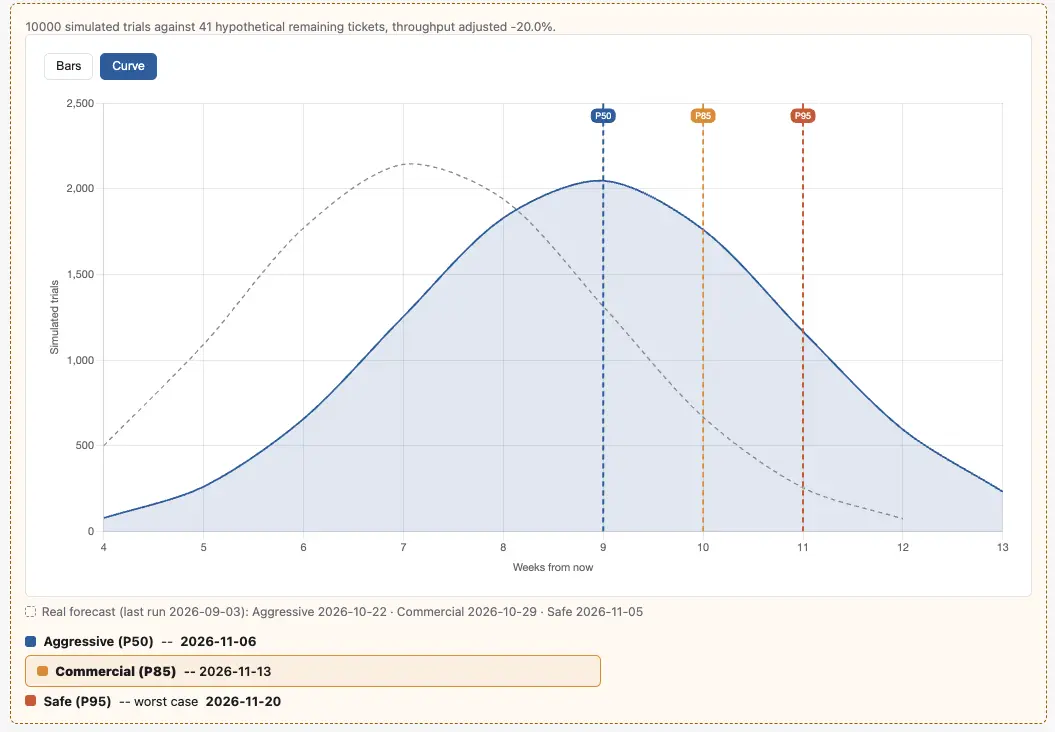
"What if the client adds twenty more tickets?" "What if we bring on a second developer for a month?" Those questions come up in every client engagement, and until now the only way to answer them in PtahCast was to actually edit the board — change the backlog, re-run a real forecast, then remember to change it all back. That's not a sandbox, that's just risk with extra steps. What-If is the sandbox: a place to ask the question and see the shape of the answer in seconds, without coming anywhere near a client-facing number.
What it does
Every board with at least one real forecast on file now has a What-If page. It's a small form with two inputs: a remaining scope override, pre-filled with the board's real current backlog but editable to whatever hypothetical total you want to test, and a throughput multiplier — a plain percentage adjustment on the board's real historical throughput, like +15% for an added developer or -20% for a sprint of reduced capacity. Submit it, and PtahCast runs the exact same Monte Carlo engine that powers a real forecast — 10,000 simulated trials, same percentile math — against your adjusted numbers, and hands back an Aggressive (P50), Commercial (P85), and Safe (P95) date, exactly like a real run would.
The important part is what doesn't happen: nothing is written to the database. No Forecast row is created, nothing appears in the accountability log, and a client portal never sees any of it. Refresh the page and the scenario is gone, like it never happened — because as far as PtahCast's records are concerned, it didn't.
The ghost: seeing the hypothetical against the real
A number on its own is hard to judge. "P85 lands six weeks out" means very little unless you know what the real forecast currently says. So the What-If chart doesn't show the hypothetical curve floating alone — it renders your board's actual, last-run real forecast behind it as a light gray dashed curve, a ghost of the committed number sitting under the scenario you're testing. A text line above the chart legend spells out the same comparison in words: "Real forecast (last run date): Aggressive date · Commercial date · Safe date." Add a developer and the ghost sits visibly behind and to the left of your new curve; absorb twenty more tickets and it sits behind and to the right. The shift itself becomes the thing you're looking at, not just two unrelated dates.
The ghost is deliberately just a shape for reference — no tooltip, no reference lines of its own, nothing that competes with the scenario it's sitting behind. It answers "how does this compare to what I've already told the client," and nothing more.
Why it looks unmistakably different
A hypothetical result sitting in the same visual style as a real forecast is exactly the kind of thing that gets screenshotted and sent to a client by accident. So the What-If page doesn't just carry a banner saying "Hypothetical — not saved, not visible to your client" — the whole result block gets a dashed amber border and a warm background, the same warning language PtahCast already uses elsewhere on the site, so a glance from across the room is enough to tell a what-if apart from a committed number. If you can't tell the difference at a glance, the banner text was never going to save you.
What it doesn't do
A few deliberate scope decisions for this first version:
It doesn't persist scenarios. There's no "saved what-ifs" list in v1 — every scenario is a one-off, cleared on refresh. Naming and revisiting a scenario later is a natural next step, not something this version tries to do.
It doesn't take a hand-typed throughput series. Only a single multiplier on your real history — enough to answer "more capacity" or "less capacity" without asking anyone to fabricate a week-by-week number they'd have to defend.
It needs a real forecast on the board first. The throughput history a what-if scenario runs against is the same history a real forecast bootstraps the first time it runs. A board that has never had a real forecast has no history to adjust yet — What-If will point you to run one first rather than guessing.
It's internal only. No client-facing surface at all. This is a tool for the agency side of the conversation, not something a client ever sees.
Same access, same engine
What-If sits at the same permission level as running a real forecast — nothing new to configure, nothing to turn on. Available on every plan, on every board that's already run a forecast once. Open the page, adjust the two numbers, and see the shape of the answer against the ghost of what you've already committed to.